
Open source
The complete source code is available for review. What the software does with your data can be read, not just believed.
Open source · Windows · Your own server
Vehistra is open source fleet management software for Windows. Vehicles, drivers, deadlines, maintenance, damages, accidents, workshop orders and license plates live in one database on your server – on every workstation at the same time.
Why Vehistra
Fleet tools are often tied to a subscription, someone else’s cloud and a closed data model. Vehistra takes a different route.
The complete source code is available for review. What the software does with your data can be read, not just believed.
Database, documents and backups live on your server inside the company network. No external storage, no telemetry, no transfer to third parties.
Driver changes, plate swaps, inspections, service intervals, accidents, workshop orders, retirement: Vehistra models what actually happens in daily operations.
History is appended, never overwritten. A driver change closes the previous period instead of replacing it.
Feature set
From the vehicle record to the audit log – in one application, on one data set.
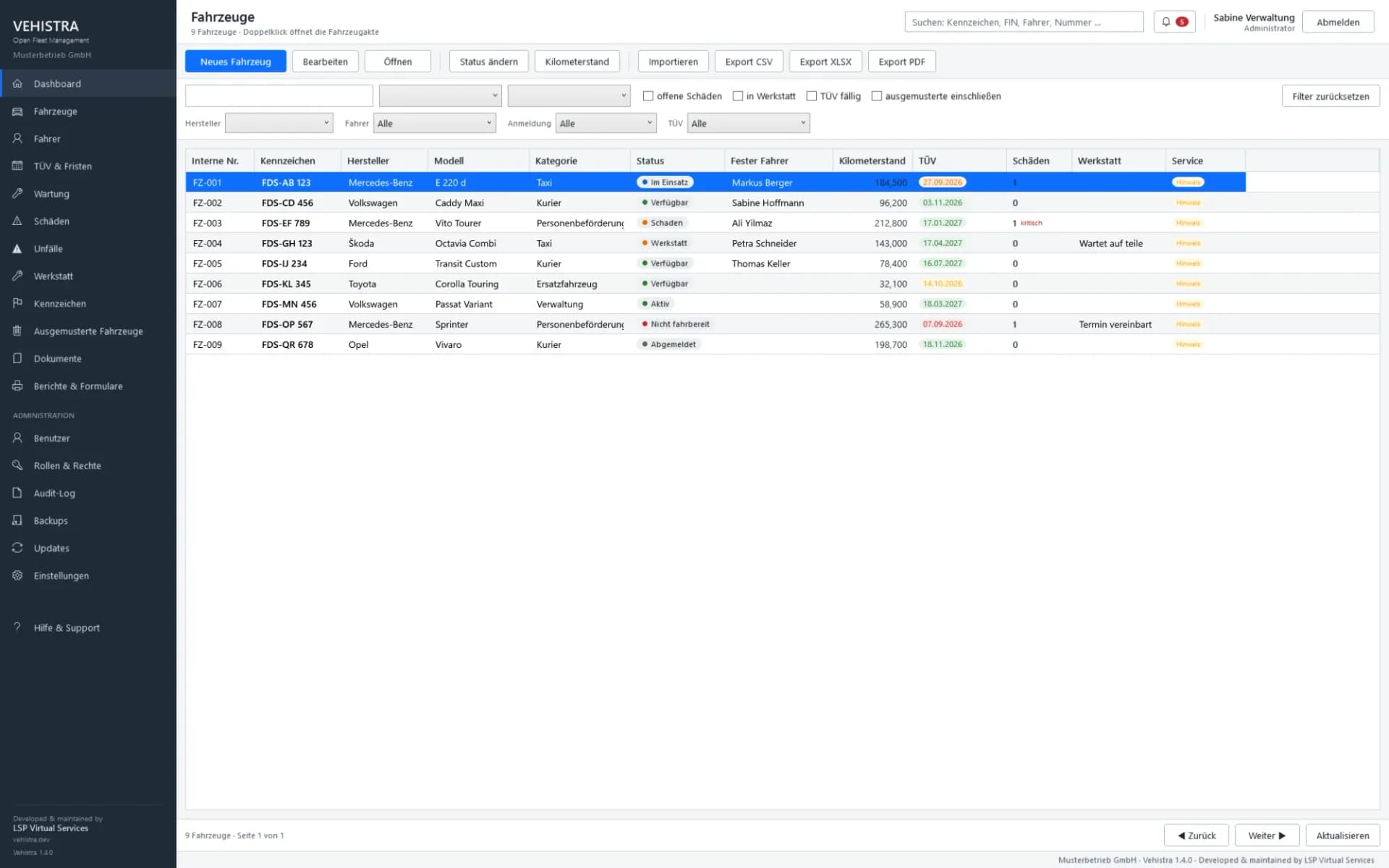
Master data, categories, statuses with defined business meaning, fuel and transmission – plus the complete vehicle record.
Driver master data, a permanent driver per vehicle, a gapless assignment history with periods – and a driver record that shows all of it on one page.
Plate inventory including free plates, assignment with period and reservations with expiry warning.
Retired vehicles remain intact and findable, with reason, deregistration date and final mileage.
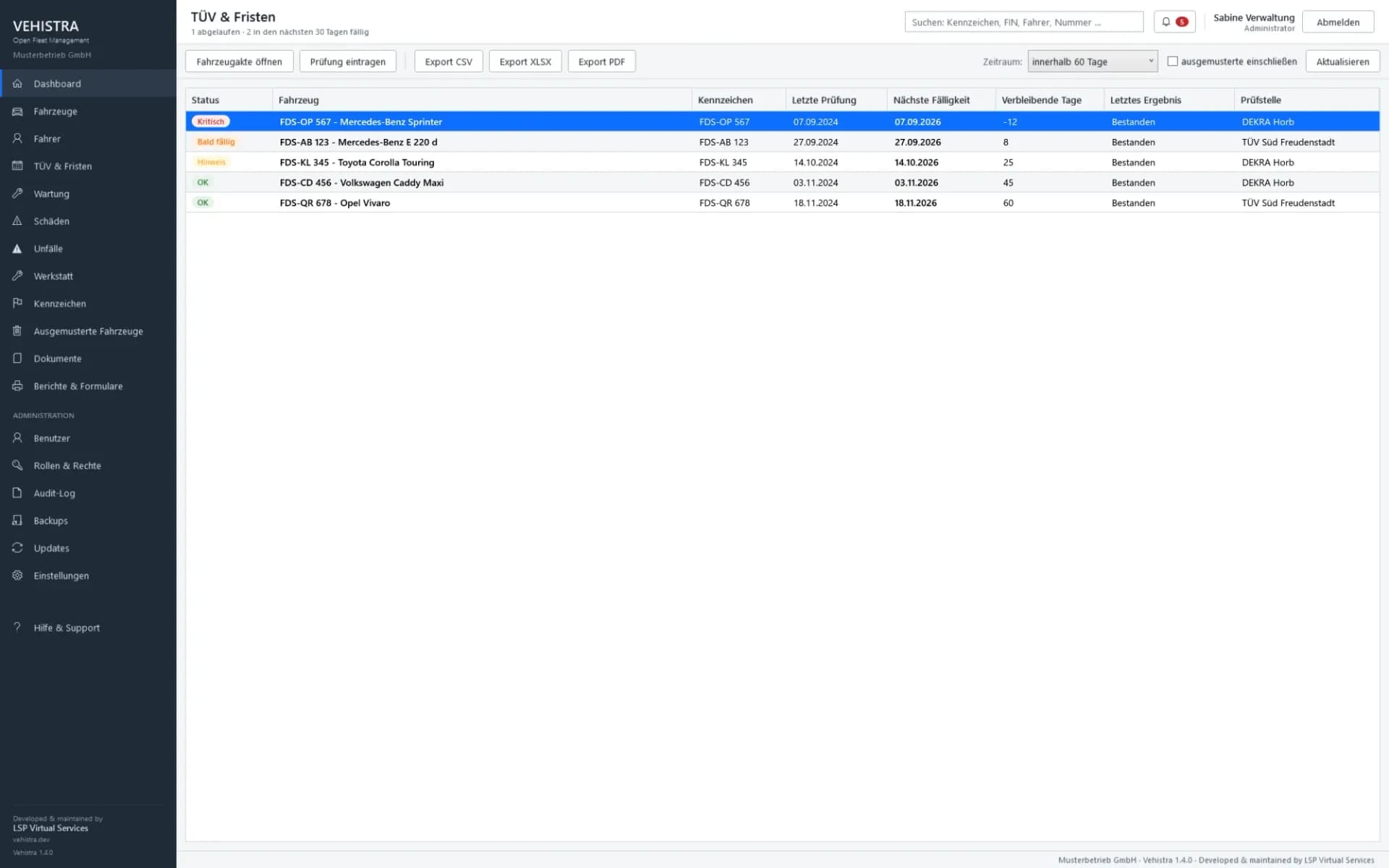
Main and emissions inspections with result, next date, remaining time and graduated warning levels.
Intervals by date, by mileage or by both – with their own due-date check per vehicle.
Damage reports with priority, status, affected area, cost, workshop reference plus photos and assessments.
Accident records by type of event, with involved parties, witnesses, police station and file number.
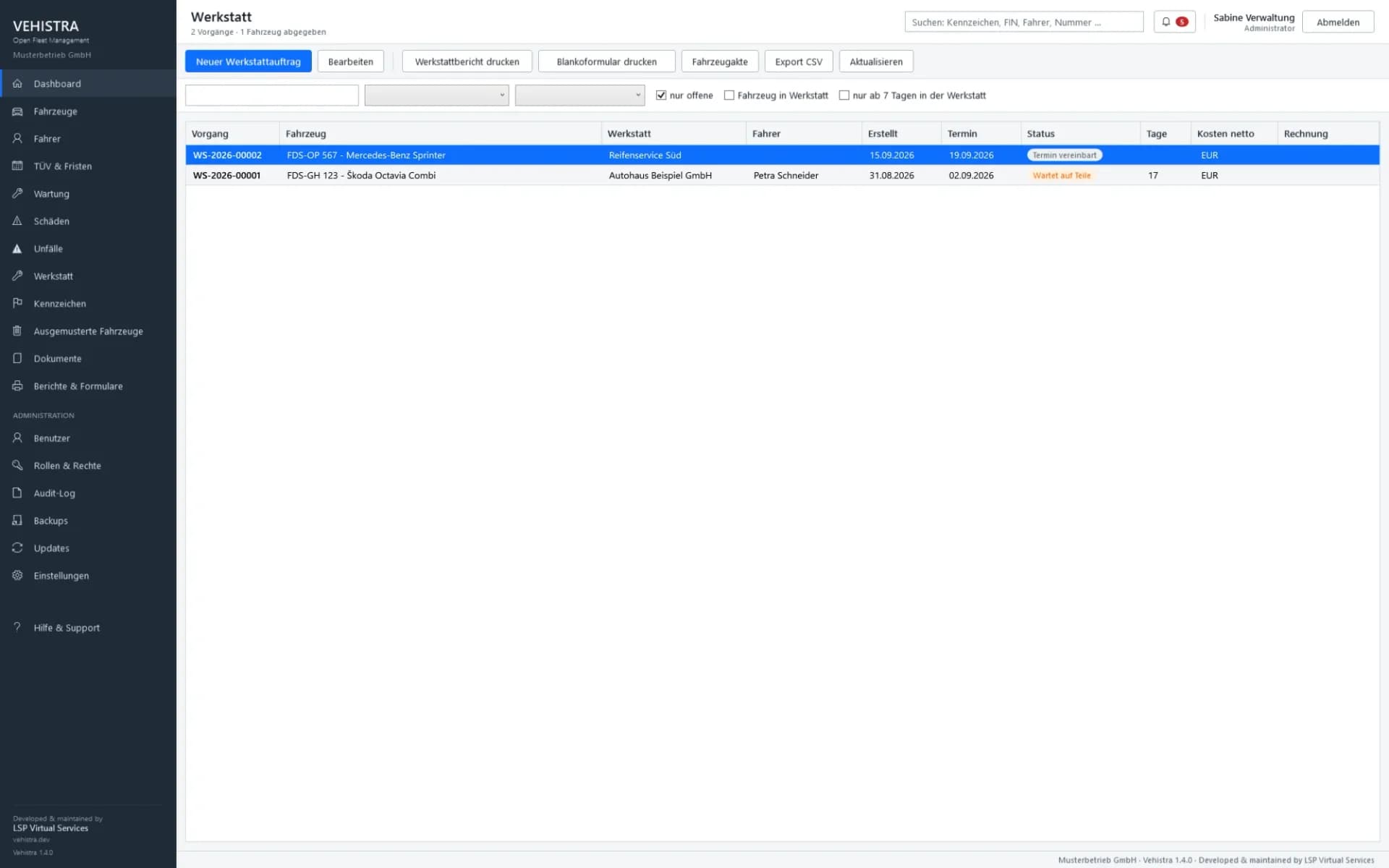
From “planned” through “waiting for parts” to “collected”: seven statuses, dates, dwell times and cost.
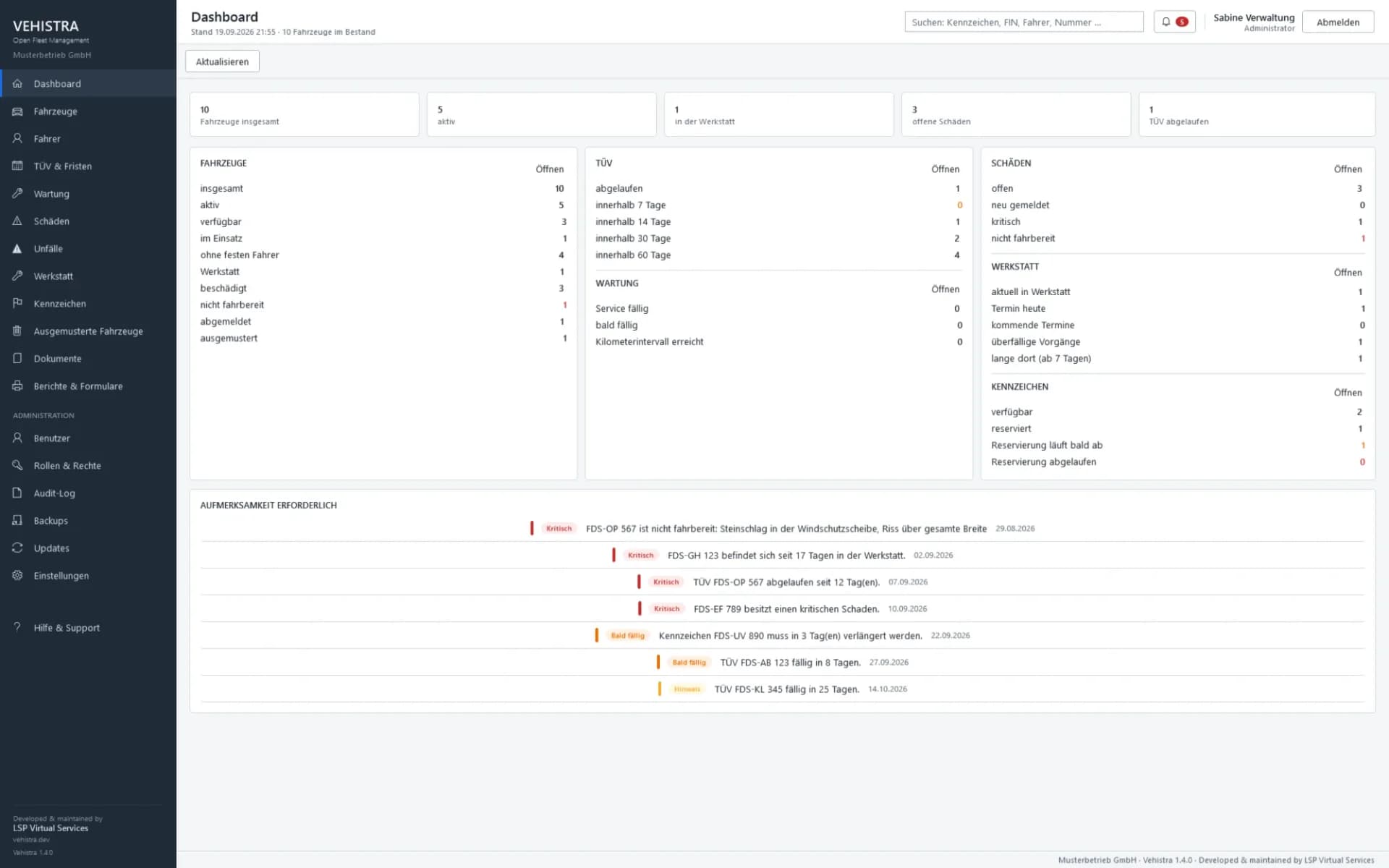
Fleet metrics and everything that is due now. Clicking a number opens the list behind it, already filtered.
Vehicle record, accident report, workshop report and lists as true vector PDFs in DIN A4.
Registration papers, invoices, assessments and photos by category – centrally on your own server.
Driver changes, plates, inspections, maintenance, workshop, accidents and retirement – as a timeline per vehicle.
The installer asks for the operating mode: everything on one computer – without a database server there, the database is a file – or a shared database in the company network. Switching later works without data loss.
All workstations work on the same database at the same time. No local copies, no synchronisation.
Seven prepared roles from staff to management, freely extensible – enforced in the services, not only in the interface.
Records who changed what and when. Neither visible nor modifiable for regular staff.
A wizard guides through database, folders, shares and the first administrator account in twelve steps.
Vehicle record
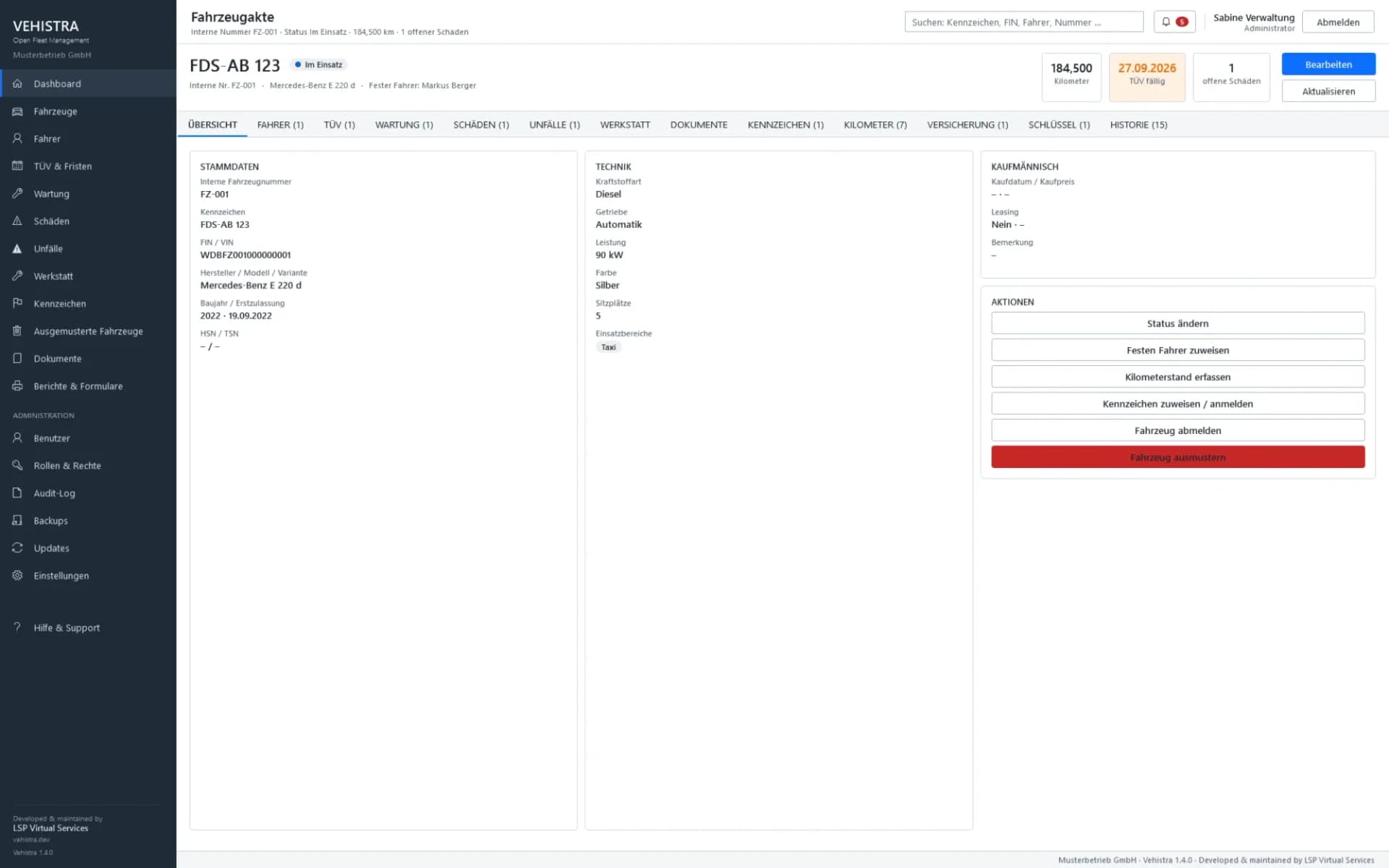
Master data, driver, plates, keys, inspections, maintenance, insurance, damages, accidents, workshop orders, documents and mileage live in a single record. No folder hunting, no second spreadsheet.
B-VH 1042
Mercedes-Benz Vito · 2022
Deadlines
Inspections, service intervals, insurance, plate reservations and workshop dates come together in one overview – with the same state on every workstation.
Needs attention
Workflow
A reported damage does not stand alone: it is linked to the vehicle, to the accident, to the workshop order and to the cost – and it stays findable after it is closed.
Damage or accident with priority, area, involved parties and photos.
Seven statuses from “planned” to “collected”, with dates and dwell time.
Record the cost, attach the invoices.
Accident and workshop report as PDF, the case stays on the vehicle.
History
Vehistra has no hard deletes. Every assignment has a period, every change has an author. Retired vehicles remain intact and findable.
Registration
Vehicle created, plate and keys assigned
Driver change
The previous period ends, a new one begins
Inspection passed
Inspection recorded, next date scheduled
Maintenance
Service interval met, next due date calculated
Workshop
Order with dwell time, cost and report
Retirement
With reason and deregistration date – not deleted
Architecture
Vehistra runs as a Windows program on every workstation. The shared database sits on your Windows server inside the company network, together with documents, backups and updates. Every workstation sees the same state – there are no local copies that would need synchronising.
No cloud, no telemetry, no transfer to third parties. Everything stays in the company network.
If you run the fleet on your own, choose the solo installation: program, database and backup then live on a single PC – with no database server at all, the database is a single file. Network shares, firewall rules and TCP/IP are not needed, and setup takes about ten minutes. Moving to network operation later works without data loss.
Workstations
Windows server · always available
Data ownership
Vehistra needs no provider to hold your vehicle data. Everything sits where you can back it up, inspect it and, if it comes to that, switch it off.
Platform
Vehistra is a real Windows desktop application – not a web service wearing a Windows coat, and not an Electron shell.
Download VehistraWPF on .NET 10 – fast lists, keyboard operation, familiar behaviour.
Vehistra-Setup.exe sets up a workstation in a few minutes.
On request the database authenticates with the Windows account.
Workstations from Windows 10 (64-bit), servers from Windows Server 2019.
Setup
Network or solo – the installer asks, and sets up the rest accordingly.
The wizard walks through database, folders and the first account in twelve steps.
In network mode: load the company configuration, test the connection, done. A solo installation skips this.
Create vehicles and drivers or take over existing lists.
Updates
A new version is placed on the server once. Every workstation detects it at startup and installs it itself. An update never deletes the fleet database and never recreates it.
Read the update guideA look inside
Screenshots from the application will be published with the first public version.
Who it is for
Vehistra grew out of a running operation and is built for fleets from around 150 vehicles and some fifteen workstations – not for a single industry.
The source code is open, the guides are complete, the first public version is in preparation.